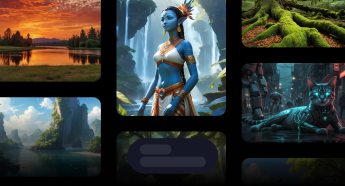
Prompt once. Explore many visual directions.

Studio AI text-to-image pairs your language with model-specific controls so art directors and marketers can diverge quickly, then converge on a winner.

Prompt once. Explore many visual directions.

Built for production-ready workflows

Structured controls, upfront coin estimates, and a unified MotionElements account—so you can brief, generate, and iterate without juggling separate tools.

Creative breadth without tool-hopping

Stay inside one layout while switching models that emphasize realism, illustration, or stylized looks.

Try now

Parameters that match campaign needs

Aspect ratio and model-native options keep outputs aligned with placement specs from the first render.

Try now

Iterate with confidence

Reset, duplicate ideas, and estimate spend so experimentation stays predictable for teams.

Try now

Frequently asked questions

Practical answers about Studio AI billing, outputs, and how this tool fits your pipeline.

What can I create with Studio AI text-to-image?
Concept frames, social posts, packaging visuals, and mood boards from natural-language prompts—paired with model-native controls so pixels align with placement specs early.
How is text-to-image different from illustration styles?
Illustration presets emphasize curated commercial illustration lanes; general text-to-image focuses on broader photographic or stylized renders tied to each `/v3/tools` model.
Does Studio AI support negative prompts?
When your selected model exposes negative prompts in the form, you can steer away from unwanted motifs—otherwise rely on prompt wording and subsequent variation passes.
Can I upscale or animate results later?
Yes—teams commonly chain stills into upscaling, variations, or motion tools inside Studio AI while preserving prediction metadata.
How do I control aspect ratio?
Choose supported ratios in the tool UI; unavailable ratios are hidden per model so you do not accidentally request incompatible geometry.
What improves prompt-to-pixel fidelity?
Be explicit about subject, lens feel, lighting, and materials—then iterate with small wording deltas rather than giant rewrites for faster convergence.
Where do downloads live?
Successful generations appear in Studio AI prediction history with downloadable assets linked from each finished job.
Who should use text-to-image in an agency workflow?
Creative leads prototyping directions, performance marketers testing hooks, and producers sourcing placeholder art before expensive shoots.

Try this tool in Studio AI

Jump straight into the generator with your MotionElements login—the same credits and downloads as the rest of Studio AI.

Try now